




ORDER
TODAY


Starlink Mini vs. Standard: Which is Better for Your Event?
August 27, 2026
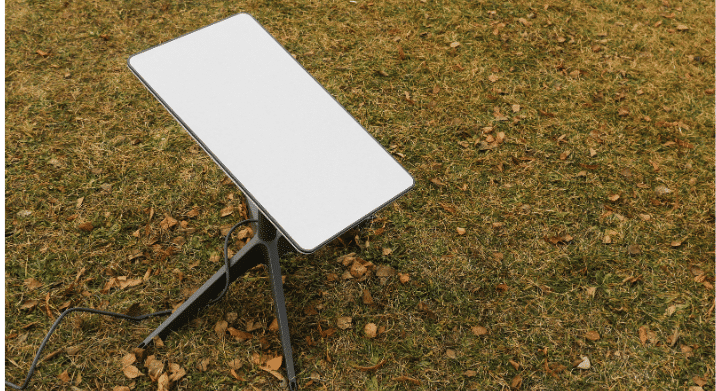
When your event lands somewhere without reliable internet — a remote festival site, an open field, a rooftop, or a production location miles from the nearest tower — satellite internet is often the only answer. These two Starlink satellite options (the compact Mini and the full-size Standard) dominate the conversation for event organizers weighing their choices. Understanding Starlink Mini vs. Standard helps you match the right hardware to your event’s size, power situation, and connectivity demands.
This guide breaks down the Starlink Mini vs. Standard for events, comparing size, speed, power, and portability, so you can choose the kit that keeps your team and attendees connected.
What Is the Difference Between Starlink Mini and Starlink Standard?
The short answer: the Mini is a smaller, lower-power, highly portable dish with a built-in WiFi router, while the Standard is a larger dish that delivers slightly higher speeds and wider coverage for higher-demand use. Both connect to the same Starlink constellation of low-Earth-orbit satellites, and both use an electronic phased array antenna that tracks satellites automatically without physically moving.
Starlink Size Comparison
The Starlink Mini vs Standard size difference is significant and often the deciding factor for portable event setups.
The Starlink Mini measures roughly 11.75 x 10.2 x 1.45 inches and weighs about 2.43 pounds (2.56 pounds with the kickstand). It’s small enough to fit in a daypack. The full Mini kit weighs approximately 6 pounds packaged.
The Standard dish is considerably larger at around 23 x 15 inches and weighs roughly 7 pounds for the dish alone, before adding the separate router and cabling. For a Starlink size comparison at a glance, the Mini is about half the footprint of the Standard.
Starlink Speed Comparison
For Starlink Mini vs Standard speed, the two are closer than their size difference suggests. The Standard dish delivers download speeds generally in the 50–200 Mbps range with uploads around 5–20 Mbps. The Mini offers comparable download performance for most uses despite its smaller size, though the Standard tends to edge ahead in raw speed and consistency under heavy load.
For most events, both deliver enough bandwidth for POS transactions, registration, streaming, video calls, and attendee connectivity. The Standard’s advantage shows up when you’re supporting more simultaneous users or bandwidth-heavy production work.
Starlink Power Consumption Comparison
This is where the two diverge most for event use. The Starlink Mini draws roughly 25–40 watts during typical operation, while the Standard dish consumes considerably more, generally in the 75–100 watt range during active use.
That difference matters enormously for outdoor and remote events. The Mini’s low draw means it can run off a portable power station, a USB-C power bank, or a vehicle’s DC outlet, making it ideal for off-grid festival sites or mobile production. The Standard typically relies on AC wall power, which usually means a generator or shore power at a remote location.
Starlink Mini vs. Standard Comparison Table
| Feature | Starlink Mini | Starlink Standard |
|---|---|---|
| Dish size | ~11.75 × 10.2 × 1.45 in | ~23 × 15 in |
| Dish weight | ~2.43 lb (2.56 lb w/ kickstand) | ~7 lb (dish only) |
| Download speed | Comparable, 50–200 Mbps range | 50–200 Mbps |
| Power draw | ~25–40W typical | ~75–100W typical |
| Router | Built-in WiFi router | Separate Gen 3 router |
| Power options | AC, USB-C, DC/12V | AC wall power |
| Best for | Portable, off-grid, smaller footprints | Higher-demand, more users, fixed power |
| Antenna type | Electronic phased array | Electronic phased array |
Which Should You Choose for Your Event?
The Starlink Standard vs. Mini decision comes down to your event profile:
- Choose the Starlink Mini when you’re running off-grid or on battery/solar power, portability matters, you’re supporting a smaller footprint like a single activation, food booth, or production team, or you need to move the setup between locations.
- Choose the Starlink Standard when you have access to AC or generator power, you need to support more simultaneous users, or your event demands maximum speed consistency for streaming or heavy production workloads.
Both work on Starlink’s portable Roam service, but the Mini’s power flexibility makes it the more versatile roaming option for events that move.
How eTech Rentals Fits In
Choosing the right hardware is only half the equation. Deploying satellite internet at an event, positioning the dish for a clear view of the sky, configuring the network, and keeping it stable throughout your event is where an experienced rental partner makes the difference.
eTech Rentals provides satellite internet rentals specifically for events and production teams, with equipment that arrives fully configured and ready to use the same day it ships. Every satellite rental includes a complimentary iPad Mini rental preloaded with the app needed to activate your connection, making setup as simple as possible.
Case Study: Choosing the Right Connectivity Solution
When an event production company needed rock-solid internet for a corporate training event and live broadcast at the SoCalGas Training Facility, the stakes were high. They had experienced a choppy livestream at the same venue the previous year and couldn’t afford a repeat.
They turned to eTech Rentals. Our team deployed a bonded internet solution that combined bandwidth from three cellular carriers with the venue’s existing connection, totaling four sources bonded into a single reliable stream. The equipment was positioned on the venue’s roof to maximize signal strength from nearby towers.
The result was a stable, uninterrupted livestream and a successful event. While this project ultimately relied on bonded cellular rather than satellite internet, it highlights an important lesson: the best connectivity solution depends on the venue. Because strong cellular coverage was available, a bonded connection offered the best performance.
Case Study
Enterprise WiFi for SoCalGas—Reliable Connectivity for Live Broadcasts
See how eTech Rentals combined three cellular carriers with the venue’s existing internet to create a stable bonded connection for a three-day corporate training event and uninterrupted live broadcast.
Read the case study →
Get the Right Satellite Solution for Your Event
Whether the Mini’s portability or the Standard’s capacity fits your event, eTech Rentals helps you choose, configure, and deploy the right satellite internet solution. Call (877) 738-3246 or request a quote to keep your remote or outdoor event connected.
Have
Questions?
Send us the details and our team will follow up with next steps.
info@etechrentals.com
Frequently Asked Questions
Does Starlink Mini perform as well as Starlink Standard?
For most event applications, yes. The Mini delivers comparable download speeds for POS, registration, streaming, and attendee connectivity despite its smaller size. The Standard edges ahead in raw speed and consistency when supporting many simultaneous users or heavy production workloads.
How big is a Starlink satellite?
This refers to the dish, not the orbiting satellites. The Starlink Mini dish measures roughly 11.75 x 10.2 x 1.45 inches, while the Standard dish is about 23 x 15 inches.
What comes in the Starlink Mini kit?
The Mini kit includes the dish with integrated WiFi router, kickstand, pipe adapter and flat mount, DC power cable, power supply, Starlink plug, and a 15-meter cable.
How big is Starlink Mini?
The Starlink Mini dish measures approximately 11.75 x 10.2 x 1.45 inches and weighs about 2.43 pounds, or 2.56 pounds with the kickstand attached.
How many watts does Starlink Mini use?
The Starlink Mini typically draws around 25–40 watts during normal operation, roughly half the power of the Standard dish. This low consumption is what makes it practical to run on portable power stations, USB-C power banks, or vehicle DC outlets at off-grid events.