




ORDER
TODAY


Bandwidth Calculator: How to Calculate Bandwidth for Events
January 6, 2026
Few things in life are more frustrating than dealing with a spotty WiFi connection, and it always seems to happen at the worst times. Whether it’s an important Zoom meeting with the boss or right in the middle of giving a demo to a potential client, we’ve all had to deal with the anxiety and sometimes even anger that comes with not having reliable internet.
With this in mind, having a reliable WiFi connection should be a top priority for event/project planners for both in-person and virtual events. Your sponsors and vendors will expect it at expos, and it provides attendees with a smoother, more engaging experience.
A lot goes into determining whether or not you are providing adequate WiFi for your event to run without kinks. In this article, we will review how event organizers can ensure they are properly making this determination. When you partner with eTech Rentals, we handle every logistical detail so you don’t have to figure out how to determine your bandwidth needs alone.
Assess How Many People Need WiFi and Usage Levels
One of the first things you should determine when assessing your event WiFi needs is how many people will need access, and what they will need it for. Attendees will likely use the WiFi on two devices: a smartphone and a laptop. Presenters will likely require more bandwidth if they are broadcasting videos or other multimedia, and vendors might need a strong connection for giving demos of their platforms or making sales on a POS.
If your event or project is going to have several hundred people attending, your WiFi needs will be much higher than if it’s only 50 people.
And when asking yourself, “how much internet bandwidth do I need?” beforehand, consider these user groups and their specific requirements:
- Attendees: Typically using smartphones and laptops for email, social media, and web browsing.
- Presenters and speakers: Require reliable upload speeds for broadcasting presentations, videos, and live demonstrations.
- Registration staff: Need consistent connectivity for check-ins, badge printing, and payment processing.
- Exhibitors and vendors: Rely on strong connections for product demos, lead capture systems, and point-of-sale transactions.
- Production teams: Often need dedicated, high-bandwidth connections for streaming and AV control.
- Media and press: May require higher bandwidth for uploading photos, videos, and live coverage.
Securing the right bandwidth is the first step toward the peace of mind you need as a planner. Our expert advice will help you solve problems before they happen by accurately projecting demand.
Understanding Bandwidth Fundamentals
Before getting into how to calculate bandwidth, it’s important to understand what bandwidth actually means. Bandwidth refers to the speed at which data travels to and from the internet, measured in megabits per second (Mbps). Think of bandwidth as water flowing through a pipe. A larger pipe allows more water to flow through at once, while a smaller pipe creates bottlenecks.
When you see internet speeds listed as “10×10 Mbps,” this refers to two separate metrics:
- Download speed (first number): How fast data flows from the internet to your devices. This is critical for streaming videos, loading websites, and downloading files.
- Upload speed (second number): The speed at which your data reaches the internet, a key factor for video conferencing, live streaming, and uploading files.
For most events, upload speed is just as important as download speed, especially if you’re broadcasting content or running hybrid events with remote attendees. We recommend planning for symmetrical (equal upload and download) speeds whenever possible to ensure your live streaming and presentations run flawlessly.
Determine Bandwidth Needs
The next step, after identifying the number of people who will need access to WiFi and each person’s usage level, is determining your event’s bandwidth needs.
Let’s quickly establish the differences first between “bandwidth” and “dedicated bandwidth.” Bandwidth is a range of frequencies within a given band that is used for transmitting a signal. Dedicated bandwidth is the bandwidth specifically set aside for a single business or entity.
When planning for an event, you want to ensure you have dedicated bandwidth. For instance, if you hold an event at a hotel and the WiFi they provide is the same one hotel guests (not attending your event) use, it can greatly reduce the bandwidth you actually get for your event exclusively and cause issues.
Once you ensure that your event will have dedicated bandwidth, you can then use a bandwidth calculator to determine the amount of dedicated bandwidth needed. By selecting all the ways WiFi is needed, like breakout presentations, registration, live streaming, etc., the calculator will break down how much bandwidth is needed for each function, and provide a total.
How to Calculate Bandwidth for Your Event
Here’s a practical bandwidth calculator chart to help you estimate requirements:
| Usage Level | Applications | 100 Devices | 500 Devices | 1,000 Devices |
| Light | Email, credit card processing, and general web browsing | 10 Mbps Product: The eBond | 50 Mbps Product: Quad Bonding Unit | 100 Mbps Product: Enterprise WiFi Devices |
| Medium | Social media, web demos, video streaming | 15 Mbps Product: Pepwave Max BR2 Pro | 75 Mbps Product: Quad Bonding Unit | 150 Mbps Product: Enterprise WiFi Devices |
| Heavy | Live video, online training, virtual labs, 4K streaming | 25 Mbps Product: Pepwave Max BR2 Pro | 125 Mbps Product: Quad Bonding Unit | 250 Mbps Product: Enterprise WiFi Devices |
This bandwidth-for-events chart provides baseline estimates, but your specific needs may vary depending on simultaneous usage patterns and the types of applications running.
How to Determine Your Bandwidth: Step-by-Step Calculation
Here’s a practical approach to how to calculate bandwidth for your specific event:
1. Count your devices: Estimate the total number of smartphones, laptops, tablets, and other connected devices.
2. Categorize your usage: Determine whether your event falls into light (email, web browsing), medium (social media, web demos), or heavy usage (video streaming, live polling, online training) based on planned activities.
3. Factor in live streaming: If broadcasting live video, add bandwidth based on video quality requirements:
- Standard Definition (SD): 1-2 Mbps upload per stream
- High Definition (720p): 2-4 Mbps upload per stream
- Full HD (1080p): 5-9 Mbps upload per stream
- 4K Ultra HD: 10-25 Mbps upload per stream
4. Add buffer capacity: Always add 20-30% extra bandwidth beyond your calculated needs to account for usage spikes and unexpected demand.
5. Consider peak usage times: Calculate bandwidth based on maximum simultaneous usage, not average usage throughout the day.
Determining how much bandwidth you need for your event on your own isn’t easy. Our team is here to guide you every step of the way so you feel confident about your connectivity.
Selecting a WiFi Provider
Once you understand the bandwidth needed, you can determine whether your event will use the WiFi many venues provide as part of the rental package or if a third-party provider, like us here at eTech, is needed to get sufficient bandwidth.
When working with a provider, a good one will become a partner in your event planning and during the event. They should help you determine how much equipment is needed based on your bandwidth requirements and where the hotspot modems should be located, assist with setup, and be on call for any issues that may arise.
Additionally, a third-party provider can help with WiFi bonding if you need supplemental WiFi to work alongside the venue-provided network. At eTech, we always work alongside our clients every step of the way to ensure our enterprise-grade 5G network equipment exceeds expectations and meets all needs.
A strong partnership should function like an extension of your team, especially in complex situations where trust is crucial. In a multi-day Expo Hall event spanning two floors, the eTech team deployed a scalable WiFi solution capable of handling thousands of attendees, exhibitor booths, and live demos—all without a single connectivity drop.
Learn more about our comprehensive WiFi services in action, and how we can provide the same seamless experience for your team.
Case Study
Seamless WiFi Deployment for the Expo Hall Event
See how event WiFi was deployed across a busy expo hall setup—plus the approach used to keep connectivity stable throughout.
Read the case study →
Testing Speeds
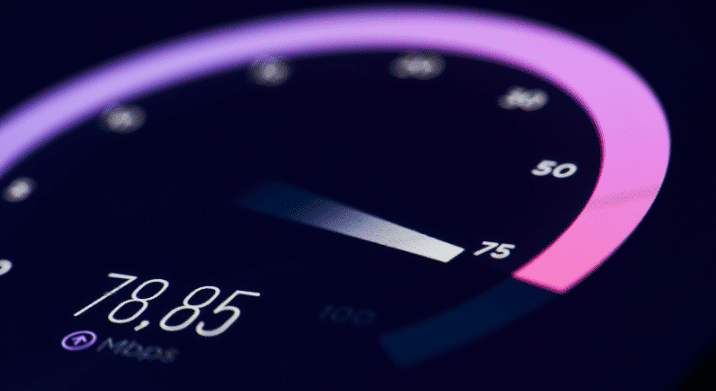
After all equipment is set up, it’s important to test speeds to ensure you are actually receiving the speeds you need. The easiest way to do this is to use an internet speed test like Ookla Speedtest. You can run a speed test on any WiFi, whether it’s a hotspot modem signal or the venue’s provided WiFi signal.
While running the speed tests, ensure the device you are testing on is connected to the correct network and not pulling signals from other networks. It’s also important to run 3-5 tests in each area and average the results to get the most accurate picture.
Best practices for testing your event bandwidth:
- Test at multiple locations throughout your venue, not just near the router.
- Test during setup before attendees arrive to establish a baseline.
- Run tests from different types of devices (smartphones, laptops, tablets).
- Test both WiFi and hardwired connections if applicable.
- Document your results to compare against your bandwidth calculator estimates.
A couple of factors that may alter your speed test results are:
Other devices connected to the internet: When running speed tests, it’s best to do so when others aren’t on the network or downloading large files. This can use up a lot of bandwidth and give you lower levels than you are actually getting. During speed testing, you want an accurate picture of the total bandwidth you are receiving.
Placement and distance to the internet source: The farther away you are, the weaker the signal will be. Also, if the signal has to travel through walls – especially concrete and other dense building materials – it will lose some of its strength. This is important to keep in mind when determining whether extra internet sources are needed for breakout sessions or at registration, especially if the nearest source is a good distance away.
Additional factors that impact WiFi performance:
- Interference from other wireless networks: Crowded WiFi channels in convention centers can cause signal degradation.
- Device limitations: Older devices may not be able to utilize the full bandwidth.
- Network congestion: Even with adequate bandwidth, too many devices on a single access point can cause slowdowns.
- Time of day: Some venues may experience degraded performance during peak hours if using shared infrastructure.
Analyzing Results
After running your speed tests and feeling like you have an accurate average of readings, the final step is to analyze the different factors of the test.
Download: When looking at your download and upload Mbps values, ensure the average across your tests is above the event’s total required bandwidth amount calculated above. 50+ Mbps is considered extremely fast and is typically enough for multiple video streams.
Upload: Upload speeds are very important for presenters (especially for digital events) as they will determine how quickly and what quality of videos and presentations can be broadcast. 10+ Mbps usually allows for high-quality streams.
Latency or Ping: Latency, also known as “ping,” is the time it takes for a request to leave a device, travel through the network, and return. You want this value to be as low as possible, ideally under 100ms. For live video conferencing and real-time applications, latency under 50ms is ideal. High latency can cause delays, freezing, and poor user experience even when the bandwidth is adequate.
What to do if your test results fall short:
- Contact your provider immediately before your event starts.
- Request additional bandwidth or supplemental hotspots.
- Relocate access points to improve coverage.
- Consider WiFi bonding to combine multiple connections.
- Prioritize bandwidth for critical functions, such as registration and main-stage presentations.
Common Bandwidth Mistakes to Avoid
Even experienced event planners can underestimate bandwidth needs. Here are the most common mistakes and how to avoid them:
- Relying on venue-provided WiFi without testing: Many venues advertise “free WiFi” that’s designed for casual guest use, not for hundreds of event attendees simultaneously streaming video. This is a common vendor chaos point, so always insist on proof of dedicated bandwidth.
- Forgetting about upload speeds: Download speeds get all the attention, but upload speeds are crucial for any event involving presentations, video conferencing, or content creation.
- Not accounting for growth: Your 300-person event might have 350 people show up or attendees might bring more devices than expected. Always build in buffer capacity. Our solution-driven process ensures we have more than enough capacity to handle unexpected surges.
- Assuming one access point is enough: Even with adequate bandwidth, a single access point can only handle a limited number of simultaneous connections. Large events need multiple access points strategically positioned throughout the venue.
- Waiting until event day to test: By the time attendees arrive, it’s too late to fix bandwidth issues. Test at least 24-48 hours before your event starts.
- Not having a backup plan: Internet connections can fail. Whether it’s a backup cellular connection, a secondary ISP line, or WiFi bonding, always have redundancy built into your plan. This is where our secure, bonded WiFi expertise comes into play. When failure isn’t an option, we have plan B, C, and D.
Why Choose eTech Rentals for Your Event Bandwidth Needs
Having a reliable WiFi network is more important than ever with the recent emergence of digital-only and hybrid events. At eTech, we are always thrilled to talk through your event WiFi needs with you and help you determine the best route for success.
Our approach is simple: We listen to your needs, calculate your requirements using our bandwidth calculator methodology, and deliver exactly what you need fast. With same-day and next-day delivery available nationwide, we’re ready when you are. Our enterprise-grade 5G network equipment is tested, configured, and ready to work the moment it arrives.
Whether you’re planning a 50-person board meeting or a 5,000-attendee conference, we have the expertise and inventory to support your event. From initial consultation through onsite support, we’re your technology partner, not just your equipment vendor.
Need to determine how much internet bandwidth you need for your upcoming event? Let’s talk. Our team will walk you through how to calculate bandwidth specific to your event type, help you understand your options, and deliver a solution that works. There’s no confusion or last-minute surprises, only reliable technology that lets you focus on what matters: your event.