Tailored technology solutions for events, tradeshows, experiential marketing, and more—designed for smooth execution and backed by expert support team.
Tailored technology solutions for events, tradeshows, experiential marketing, and more—designed for smooth execution and backed by expert support team.
Running a business means making fast decisions about checkout, inventory, and customer experience. The best iPad POS system can transform your iPad into a complete point-of-sale solution, handling everything from payments to inventory to customer data, all from one device.
Whether you’re running a retail shop, restaurant, or pop-up event, the right system matters. This guide breaks down the leading iPad POS software options for 2026, what makes them work, and how to choose the right fit for your business.
What Makes an iPad POS System Work
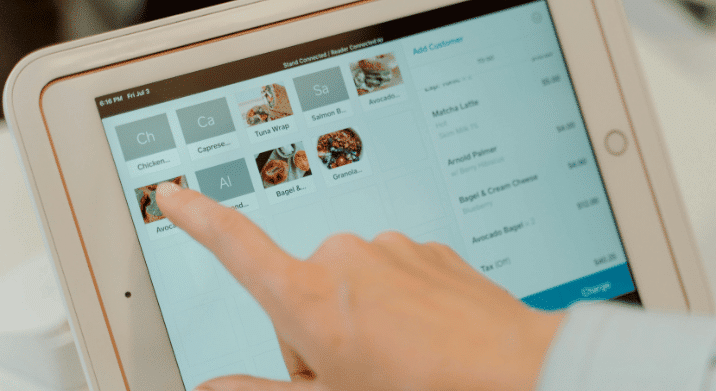
iPads are portable, intuitive, and most people already know how to use them. When you put an iPad in kiosk mode, An iPad POS system turns your iPad into a full point-of-sale terminal. The iPad serves as your hardware, while POS software handles transaction processing, data storage, and business management functions. Add a card reader, and you’re ready to accept payments.
iPad POS systems replaced bulky legacy terminals because they’re portable, affordable, and intuitive. Most staff already know how to use an iPad, so training will be minimal.
For businesses that need flexibility, an iPad POS system moves with you. Set up takes minutes, not hours.
Square consistently ranks as the best iPad POS system for small to mid-sized businesses across industries. The software is free, processing fees are transparent, and the interface is intuitive enough that staff can start using it immediately.
Square works seamlessly with iPads through the free Square Point of Sale app. The system includes inventory management, customer profiles, real-time sales reporting, and analytics.
Key Features:
Free POS software
Payment processing at 2.6% + 15¢ per transaction
Real-time inventory tracking
Offline payment mode
Compatible with 10.9-inch and most 11-inch iPads
See Square POS Systems in Action
eTech Rentals supported a footwear brand’s first pop-up shop by installing two Square POS systems paired with Verizon MiFi hotspots for reliable internet throughout the weekend. With same-day setup and onsite support, checkout stayed fast and uninterrupted.
If you’re already running a Shopify online store, Shopify POS is the best iPad for Shopify POS integration. The system syncs inventory and customer data between your online store and physical location in real time, preventing overselling and keeping stock counts accurate.
Key Features:
Real-time inventory sync between online and physical stores
Omnichannel selling capabilities
Customer profiles with purchase history
Staff management and permissions
Works with Shopify Payments
Lightspeed: Best iPad POS for Analytics
Lightspeed Restaurant and Lightspeed Retail stand out as the best POS for iPad when deep analytics and reporting matter. The system provides detailed insights into sales trends, inventory costs, customer behavior, and employee performance.
Key Features:
Advanced reporting and analytics with real-time margin tracking
Multi-location management
Customizable floor plans and table management
Employee scheduling and time tracking
Built-in loyalty program integration
Toast: Best iPad POS Software for Restaurants
Toast is a restaurant-specific iPad POS software built for full-service restaurants, quick-service spots, and bars. The system includes features designed specifically for food service operations, including table management, kitchen display systems, course timing, and online ordering integration.
Key Features:
Table management and floor mapping
Kitchen display system integration
Online ordering and delivery management
Menu customization with modifiers
Tip pooling and staff management
Clover: Best iPad POS for Customization
Clover offers flexibility through its Clover Go app, which turns iPads into mobile POS terminals with extensive customization options. The system works well for businesses with specific needs that standard POS systems don’t address.
Key Features:
Customizable interface and workflows
Extensive app marketplace
Advanced inventory controls
Multi-location support
Detailed analytics and reporting
Choosing the Best iPad POS System for Your Business
The best iPad POS system depends on your specific needs:
For simple retail or service businesses: Square offers free software, transparent pricing, and all essential features.
For Shopify store owners: Shopify POS integrates seamlessly with your online store, syncing inventory and customer data.
For restaurants and bars: Toast provides restaurant-specific features like table management and kitchen integration.
For data-driven operations: Lightspeed delivers advanced analytics and detailed reporting for optimizing margins.
For businesses needing customization: Clover’s app marketplace and flexible configuration work for unique requirements.
Consider these factors when evaluating the best iPad POS software: industry fit, pricing structure, offline capability, hardware compatibility, scalability, and support availability.
eTech Rentals: Complete iPad POS Solutions
Need iPads that are configured and ready for POS use? eTech Rentals delivers tested, charged iPads that work with all major POS systems—Square, Shopify, Toast, Lightspeed, and Clover.
Our iPads come pre-installed with the latest essential software and apps you need. We can also load any specialized or custom software for you, including POS applications, so you don’t have to do it yourself. Whether you’re launching a new location, running a temporary activation, or testing a POS system before committing long-term, we provide iPads by the day, week, or month.
What eTech Rentals offers:
iPads compatible with all major POS systems (10.2-inch, 10.5-inch, 10.9-inch, and 11-inch models)
Pre-configured devices with POS software already installed
Square Stand kits with iPad, stand, receipt printer, and cash drawer
Square Terminal rentals for mobile POS
Same-day delivery in Southern California
Next-day shipping nationwide
Optional onsite technicians for setup and support
Check out our iPad rental solutions for events, pop-ups, and business needs. Need a complete POS setup? Explore our POS system rentals, including Square Stand kits and Square Terminal options.
From registration tables to vendor booths, our iPads arrive fully charged and pre-loaded with all the apps, logos, and settings you need..
Technology failures happen. Even with perfect planning, WiFi can drop during your event. The difference between a minor hiccup and a major disaster comes down to preparation. Here’s how to build a network outage contingency…
Your event’s success depends on reliable connectivity. Whether you’re managing registration kiosks, processing transactions, streaming live content, or keeping attendees engaged on social media, internet access is no longer optional. Here’s how to set up…
When your event, business, or production depends on reliable internet, a single connection often isn’t enough. You need speed, resilience, and connectivity that won’t fail when it matters most. That’s where bonded internet comes in….
Few things in life are more frustrating than dealing with a spotty WiFi connection, and it always seems to happen at the worst times. Whether it’s an important Zoom meeting with the boss or right…
Setting up a POS system on your iPad requires downloading your chosen POS app from the App Store, creating an account with the POS provider, connecting a compatible card reader, and configuring your products or menu items. Most systems, like Square, Shopify POS, and Toast, guide you through setup step by step. The entire process typically takes 15-30 minutes. eTech Rentals can deliver pre-configured iPads with POS apps already installed, saving you setup time. Additionally, our team is there to support you every step of the way. Call us to learn more.
How do iPad POS systems work?
iPad POS systems combine your iPad hardware with cloud-based software and payment processing. When you ring up a sale, the POS app calculates the total and communicates with a connected card reader to process the payment. Transaction data, inventory updates, and customer information sync to the cloud in real time, allowing multiple devices to access the same data simultaneously. The system processes payments through encrypted connections to payment processors, then deposits funds to your bank account. Many systems, like Square, also offer offline mode, so you can continue processing transactions even without internet connectivity.
Can I rent an iPad with a POS system already installed?
Yes, eTech Rentals provides iPads that come ready to use with POS systems already configured. We deliver tested, charged iPads compatible with Square, Shopify POS, Toast, Lightspeed, Clover, and other major POS platforms. Our team can pre-install your chosen POS software and configure basic settings before delivery, so you can start processing transactions immediately. This works well for temporary events, seasonal operations, new location launches, or businesses testing different POS systems. We offer flexible rental terms by the day, week, or month with same-day delivery in Southern California and next-day shipping nationwide. Request a quote today.